Last updated: August 21, 2026
For the full list of AI crawlers with their user agents and whether blocking each one costs you AI-search visibility, see the AI crawler list.
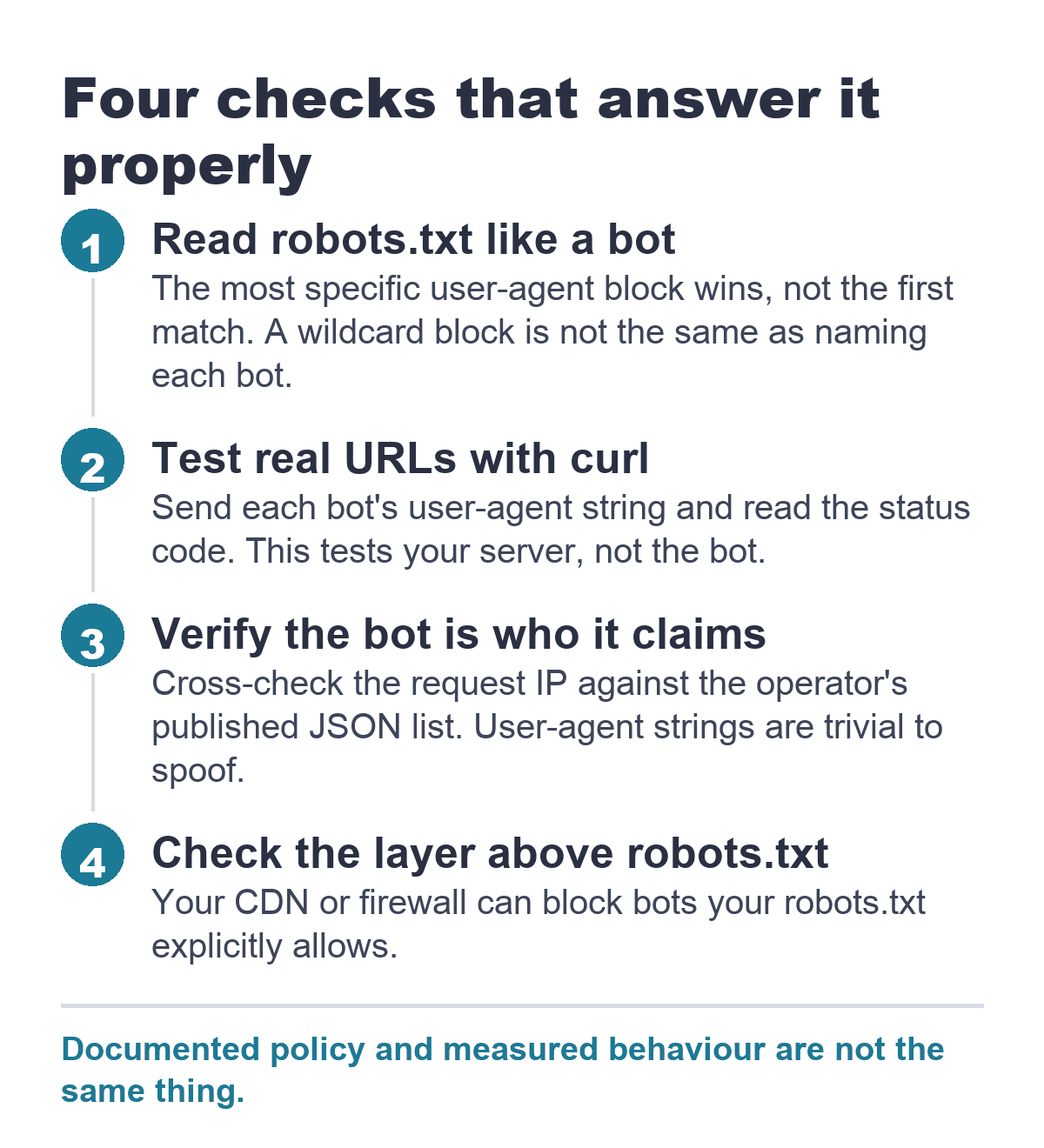
To check which AI bots can access your website, read your robots.txt the way bots do (the most specific user-agent block wins), test live URLs with curl using each bot’s reported user-agent string, verify real bot traffic against the operator’s published IP list, and check your CDN or firewall, which can block bots your robots.txt explicitly allows.
This is three questions, not one
“Can AI bots access my website?” sounds like one checkbox. It is not. There are three distinct layers, and a yes at any one of them does not mean the same thing at the others.
Layer one is network-level reach. Can the bot establish a connection to your origin server, or does something upstream (a CDN, a firewall, a WAF) drop the request before your server ever sees it? Layer two is instruction-level permission. Does your robots.txt file tell a specific bot it is allowed or disallowed, and is the bot’s user-agent token actually listed in a block that applies to it? Layer three is behavioral compliance. The bot reached the page, your robots.txt said yes, but does the bot actually follow that instruction, or does it pull the page anyway?
You can check layers one and two yourself today with free tools. Layer three is harder. It depends on what the bot operator documents, what independent measurement shows, and whether the fetch is for training, search indexing, or a live user request. The distinction matters because the rules change depending on the purpose.
Bot access is the first gate of AI search readiness; if crawlers cannot reach your content, nothing downstream matters.
The AI bots worth checking for
Not every bot that scrapes the web feeds an AI model, and not every AI-labeled user agent is honest about its identity. The bots that matter right now fall into three groups.
Training crawlers scrape pages at scale to build or update the datasets that train large language models. These run on their own schedule, independent of any user prompt, and they consume a lot of bandwidth if left unrestricted. GPTBot, ClaudeBot, Bytespider, CCBot, meta-externalagent, and Amazonbot all serve this function. Some are transparent. Some are not.
Search and retrieval bots crawl the web to populate live answer engines, the way Googlebot crawls for Google Search. They do not train foundation models, but they do determine whether your content surfaces inside ChatGPT, Claude, or Perplexity when someone asks a question. OAI-SearchBot, Claude-SearchBot, and PerplexityBot fall into this category.
User-triggered fetchers are the newest and most misunderstood group. When a person asks ChatGPT, “can you read this whitepaper on this page and summarize it,” the platform sends a fetcher (ChatGPT-User) to grab the page at that moment. The request is not a scheduled crawl. It is a live retrieval initiated by an end user. OpenAI’s documentation explicitly states that robots.txt rules “may not apply” to ChatGPT-User for this reason. Perplexity’s documentation says Perplexity-User “generally ignores robots.txt” in the same scenario. Anthropic’s Claude-User, by contrast, respects robots.txt per Anthropic’s stated policy. Same function, different rulebooks.
Here is the full reference set with documentation links.
Verified against operator documentation, August 2026.
| Bot | User-agent token | What it does | Respects robots.txt? |
|---|---|---|---|
| GPTBot (OpenAI) | GPTBot/1.4 |
Training-data crawling for OpenAI models | Yes |
| OAI-SearchBot (OpenAI) | OAI-SearchBot/1.4 |
Surfaces sites in ChatGPT search results | Yes |
| ChatGPT-User (OpenAI) | ChatGPT-User/1.0 |
Live fetch triggered by a user’s in-chat request | “May not apply,” per OpenAI |
| ClaudeBot (Anthropic) | ClaudeBot |
Training-data crawling for Claude models | Yes |
| Claude-User (Anthropic) | Claude-User |
Live fetch when a Claude user asks about a page | Yes |
| Claude-SearchBot (Anthropic) | Claude-SearchBot |
Indexes content for Claude search | Yes |
| Google-Extended (Google) | Google-Extended |
Opt-out token for Gemini/AI training use | Yes |
| PerplexityBot (Perplexity) | PerplexityBot/1.0 |
Indexes sites for Perplexity answers | Yes |
| Perplexity-User (Perplexity) | Perplexity-User/1.0 |
Live fetch triggered by a user’s question | “Generally ignores robots.txt,” per Perplexity |
| CCBot (Common Crawl) | CCBot/2.0 |
Builds the open Common Crawl dataset, widely reused for LLM training | Yes |
| meta-externalagent (Meta) | meta-externalagent |
Crawling/training for Meta AI | Yes |
| Bytespider (ByteDance) | Bytespider |
Training-data crawling and Toutiao indexing | Documented yes; no verification method exists |
| Amazonbot (Amazon) | Amazonbot/0.1 |
Improves Amazon products; may feed AI training | Yes |
Step 1: Read your own robots.txt the way a bot reads it
Bots do not scan robots.txt for their name and stop at the first mention. The parsing rule, formalized in RFC 9309, is most-specific-user-agent-wins. A bot looks for a User-agent: declaration that names it exactly. If it finds one, it follows only the directives in that block. It ignores the User-agent: * block entirely. If no block names it, only then does it fall back to the wildcard.
This means a wildcard Disallow: / is not the same as naming each bot individually. A site that puts User-agent: * followed by Disallow: / and then lists User-agent: GPTBot followed by Disallow: is, by the specification, allowing GPTBot full access while blocking everything else. The named block takes precedence.
Here is an example of a robots.txt file you might encounter, and how to interpret its directives. This one blocks AI training crawlers, keeps search bots open, and uses the Google-Extended token to opt out of Gemini training use. Reading it shows how the most-specific-user-agent rule works: GPTBot is blocked, OAI-SearchBot is allowed, and Google-Extended blocks Gemini without affecting Googlebot.
User-agent: GPTBot
Disallow: /

User-agent: ClaudeBot
Crawl-delay: 1
Disallow: /

User-agent: Bytespider
Disallow: /

User-agent: CCBot
Disallow: /

User-agent: meta-externalagent
Disallow: /

User-agent: Amazonbot
Disallow: /

User-agent: OAI-SearchBot
Disallow:

User-agent: Claude-SearchBot
Disallow:

User-agent: PerplexityBot
Disallow:

User-agent: Google-Extended
Disallow: /
The Crawl-delay directive under ClaudeBot is non-standard, meaning not all bots recognize it, but Anthropic documents that ClaudeBot does. Setting it to 1 second throttles its request rate without requiring a full block, which is useful if the bot’s visit volume is the concern rather than the training use itself.
A final note on the wildcard trap. If your robots.txt has only a User-agent: * block with a partial disallow, and no block names GPTBot, then GPTBot sees the wildcard rules. It assumes the allowed directories are fair game. If you meant to block training crawlers entirely, an explicit named block is the only way to be certain the message was received.
Step 2: Test access directly with curl
Robots.txt is an instruction. Your server configuration is what enforces it. The fastest way to confirm whether a given user agent can reach a real URL is a direct request from the command line, using a tool like curl, which sends an HTTP request from your terminal and prints the response.
Running curl with a spoofed user-agent string is not a simulation of the bot’s full behavior. It only tests what your server does when it receives a request claiming that identity. Anyone can send that string. What curl shows you is whether your configuration would serve the page or return a block, assuming the request reached the server in the first place.
Here is how to test whether GPTBot can retrieve your homepage.
curl -I -A "Mozilla/5.0 AppleWebKit/537.36 (KHTML, like Gecko); compatible; GPTBot/1.4; +https://openai.com/gptbot" https://yoursite.com/The -I flag fetches only the HTTP headers, not the full page body. Look at the first line of the response. A 200 OK means your server served the page. A 403 Forbidden means something blocked it, which could be your origin server, an Apache or Nginx rule, or a layer above it. A 301 or 302 redirect may mean a CDN is intercepting the request and sending it somewhere unexpected.
Run this test once per bot you care about, substituting the user-agent string from the table above. For ongoing monitoring, see how to track AI crawler activity. If you get a 200 for a bot your robots.txt claims to block, the block instruction is not being enforced at the server level. If you get a 403 for a bot your robots.txt allows, something upstream is overriding your rule, which is the scenario covered in Step 4; for diagnosing these blocks, see finding failed AI crawl attempts.
Step 3: Verify the bot is who it claims to be
A curl test tells you whether a request with a given user-agent string gets through. It cannot tell you whether the request actually came from who it claims to come from. Spoofing a user-agent string is trivial. The real test is whether the IP address behind the request belongs to the organization that owns the bot.
Several major AI companies publish their IP ranges as machine-readable JSON files specifically so site operators can cross-check. OpenAI publishes its GPTBot ranges at openai.com/gptbot.json and its OAI-SearchBot ranges at openai.com/searchbot.json. Anthropic publishes its crawler IPs at claude.com/crawling/bots.json but warns that IP-based blocking may not work persistently and that robots.txt is the supported control method. Perplexity publishes ranges for both its bots at perplexity.com/perplexitybot.json and perplexity.com/perplexity-user.json. Amazonbot publishes its IPs at developer.amazon.com/amazonbot/ip-addresses/. Common Crawl operates from dedicated IP ranges with reverse DNS set up so operators can confirm a CCBot request is genuine, which matters because other parties have been caught falsely using that identity.
The verification process is a two-step check on any request in your server logs that claims to be one of these bots. First, look up the request’s IP in the published JSON file. If it is not in the listed range, it is not a real request from that organization. Second, run a reverse DNS lookup on the IP to confirm the hostname resolves back to the claimed domain.
Bytespider publishes no IP range list and no verification method at all. A request claiming to be Bytespider cannot be independently confirmed as ByteDance traffic. A curl test will tell you whether your server accepts a request with that user-agent string, but you have no way to distinguish the real Bytespider from a third party impersonating it.
Step 4: Check the layer above robots.txt: your CDN and firewall
Cloudflare’s Bot Fight Mode can block legitimate AI crawlers even if your robots.txt allows them. The AI Scrapers and Crawlers toggle blocks named AI crawlers regardless of what robots.txt says. A 403 on a curl test when robots.txt says allow often means the CDN layer is overriding your instructions. For the full configuration walkthrough, see our guide on configuring the firewall layer for AI crawlers.
A related note on Cloudflare’s verified-bots directory. It is built only from crawler operators who voluntarily came forward for identity confirmation. It is not a census of everything crawling the web. A bot’s absence from that directory does not mean it is illegitimate. It means the operator never submitted for verification. Similarly, presence in the directory does not mean the bot always follows robots.txt. It means Cloudflare confirmed the operator’s identity at a point in time.
Step 5: Or use a checker tool
Several free AI bot checker tools exist, and they all do approximately the same thing: they take a URL you provide, fetch that site’s robots.txt, and compare the directives against a maintained list of known AI bot user-agent tokens. They return a report that says which bots are blocked, which are allowed, and sometimes which are unmentioned and therefore fall back to the wildcard rule.
What they can tell you is accurate as far as it goes. They correctly parse robots.txt directive matching per the standard. They flag the most-specific-user-agent problem when a named block accidentally overrides a wildcard block. They surface gaps where a bot you care about is not explicitly named and therefore falls under a catch-all rule you may not have intended.
What they cannot see is everything before robots.txt. No free checker can report whether Cloudflare’s AI Scrapers toggle is on for your domain. None can tell you whether Bot Fight Mode is dropping GPTBot requests at the edge. None can see your Nginx configuration or your WAF rules. A checker report showing “GPTBot: Allowed” is correct about your robots.txt instruction. It is silent on whether the request ever reaches your server.
The free AI Agent Readiness Check tests your site from the outside, the way an AI agent would. It sees the cumulative effect of every blocking layer at once, including CDN and WAF rules that robots.txt checkers cannot detect.
And no checker can tell you whether a bot actually complies with the instruction it received. The checker reads the posted sign. Whether the bot reads it and obeys is a separate measurement problem, and that is where the gap between policy and behavior widens.
llms.txt is not part of this checklist
A file called llms.txt has gained attention as a proposed convention for signaling to AI systems which pages on a site are worth reading. It is a plain Markdown file that lives at the root of a domain and acts as a curated index. Think of it as a table of contents for an AI that arrives at your site and wants to know where the substantive content lives.
It carries no access-control mechanism of any kind. An llms.txt file cannot block a bot. It cannot allow one. It is a pointer, not a gate. robots.txt is the only file of the two that a compliant crawler is expected to consult before fetching a page. If a bot ignores robots.txt, it will ignore llms.txt as well.
This does not make llms.txt useless. It makes it a different tool for a different job, and that distinction is worth understanding before you spend time creating one. That subject is explored separately in the llms.txt setup guide. Chrome’s Lighthouse audit checks for the presence of an llms.txt file as part of its AI agentic browsing assessment; that specific audit is covered in the Lighthouse agentic browsing audit.
What access does not guarantee
Getting a “GPTBot: Allowed” result on a checker tool, a 200 OK on a curl test, and a matching IP in OpenAI’s published JSON means you have confirmed that the real GPTBot can reach your page and that your posted instructions permit it. It does not mean you control what happens next.
Compliance with robots.txt is voluntary at every stage beyond your own server configuration. TollBit’s State of the Bots report covering the first half of 2026 found that roughly 15% of AI page-retrieval fetchers in Europe reached URLs that sites had explicitly disallowed. ChatGPT-User, Bytespider, and Youbot reached disallowed pages on close to half of the sites that named them. ChatGPT-User had the highest hit rate among those three. These are fetchers that read the “no entry” sign and went through anyway.
This is not a one-time anomaly specific to one operator. It is a measured pattern across multiple bots and hundreds of sites. It is also not entirely surprising given the documented ambiguity around user-triggered fetchers. OpenAI and Perplexity both state, in their own documentation, that their user-triggered crawlers may ignore robots.txt. The TollBit data suggests the gap between stated policy and actual behavior is wider than the documentation alone would predict.
A separate reality to internalize is that crawlable is not the same as recommended. Making a page technically accessible to OAI-SearchBot or PerplexityBot means it can appear in AI-generated answers. It does not mean it will. AI citation patterns depend on relevance signals, content structure, and the specific way each engine ranks sources, none of which is visible in a curl response header. Being crawlable and being recommended by AI are two different positions, and confusing them leads to the wrong kind of optimism.
FAQ
Does robots.txt actually stop an AI bot from accessing my site?
It stops the bots that choose to honor it. GPTBot, ClaudeBot, OAI-SearchBot, PerplexityBot, CCBot, meta-externalagent, and Amazonbot all document that they respect robots.txt directives. ChatGPT-User and Perplexity-User explicitly state that robots.txt rules may not apply to their fetches because the request is user-initiated. Independent measurement from TollBit confirms that disallowed pages still get reached in practice.
How do I know if a request claiming to be GPTBot is really from OpenAI?
Cross-check the request’s IP address against the published JSON file at openai.com/gptbot.json. If the IP appears in that list, the request is from OpenAI. Anthropic, Perplexity, and Amazon also publish their ranges. Common Crawl uses dedicated IPs with reverse DNS set up for the same purpose. Bytespider publishes no verification method, so no request claiming that identity can be independently confirmed.
What is the difference between a bot that trains AI models and one that answers a live user’s question?
A training bot like GPTBot or ClaudeBot crawls pages at scale on its own schedule to build datasets for model training. A search bot like OAI-SearchBot or PerplexityBot indexes pages for inclusion in live answer results, the way Googlebot indexes for search. A user-triggered fetcher like ChatGPT-User fires only when a person asks the AI to retrieve a specific page right now. The same page can be blocked from training while remaining available for search results. Google-Extended is explicitly designed for this split: blocking it stops Gemini training use without affecting regular Google Search.
Can I block an AI training bot but still show up in AI search results?
Yes. OpenAI publishes three separate user-agent tokens for three distinct functions. Blocking GPTBot stops training use. Keeping OAI-SearchBot allowed means your pages can still surface in ChatGPT search answers. Anthropic splits ClaudeBot and Claude-SearchBot the same way. Blocking PerplexityBot stops search indexing, and Perplexity states that neither its search bot nor its user fetcher is used for training. The only way to maintain this split is to list the bots individually in robots.txt rather than using a catch-all wildcard block.
Do I need an llms.txt file to control AI bot access?
No. llms.txt is a curation file that suggests which pages an AI should read. It carries no access-control mechanism and no compliant crawler checks it before fetching. The only file that serves as an access instruction is robots.txt. If you want to control which pages AI systems see, the robots.txt syntax is the mechanism. llms.txt becomes relevant only after a bot has already decided to crawl, which makes it a guide for attention, not a gate for access.
—
Checking which AI bots can reach your website answers the first question: can they get in? The second question is what happens once they do. The free AI Agent Readiness Check takes the next step, crawling your site the way an AI agent would and surfacing what it finds, what it misses, and what it misunderstands. Access is step one. What the agent does with the page it just pulled is where the business impact lives.