Last updated: August 21, 2026
No major AI lab has publicly confirmed consuming llms.txt in production, and Google’s search team says it is not needed for Search or AI Overviews. The file still costs about an hour to ship, and this guide shows exactly how.
If you’ve recently spotted a new “Agentic Browsing” flag in a Lighthouse or PageSpeed Insights report, you’re not alone. That audit, which we covered in detail when it first appeared, sends many site owners searching for llms.txt. This guide walks through what the file actually is, what it isn’t, and how to get one live on your site without buying into the hype.
llms.txt belongs to the parse layer of AI search readiness, the courtesy layer, not the access layer.
What llms.txt Actually Is (Per the Spec)
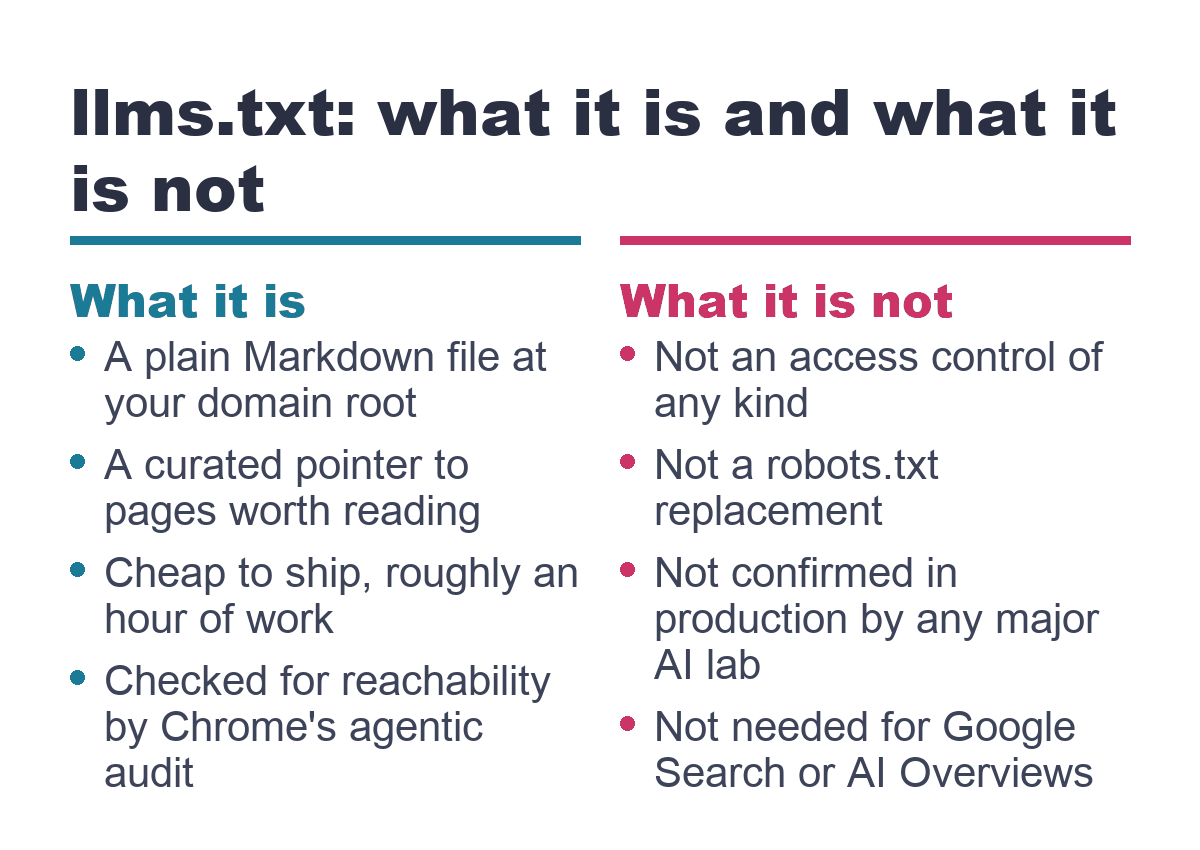
llms.txt is a proposal, not a ratified standard, published by Jeremy Howard of fast.ai in September 2024 and revised through August 2026. The idea is straightforward: provide a markdown file that helps agents (software that acts on behalf of a user, such as a browser-based assistant or a coding tool) understand what a website is about and where to find its key content. Because the file is plain markdown, both humans and large language models can read it directly.
The file lives at the root of your site, reachable at https://example.com/llms.txt. You can also place a copy at a subpath, like /docs/llms.txt, to scope it to a specific section of the site. A more specific file takes precedence over a root one, but for a small marketing or services site, a single root file is almost always enough.
The spec requires exactly one section: an H1 heading with the project or site name. Everything else is optional. If you want to follow the full suggested structure, you add a blockquote summary right after the H1, a few free-text paragraphs of context, and then zero or more H2 sections that contain markdown lists of links. Each link entry follows the pattern [Page Name](URL): one-line description. You can also include a section literally titled “## Optional” to signal that an agent can skip those links first if it needs to trim the content for its context window, the amount of text the model can process at once.
You may also hear about a companion file called llms-full.txt. This is a separate file that takes the same key pages and concatenates their full extracted text into one long markdown document, so an agent can fetch everything in one request. The smaller llms.txt is meant as an index, where the agent reads the list and then fetches individual pages as needed. For most industrial and manufacturing marketing sites, llms.txt alone is the right choice. A note on the distinction: the llms.txt/llms-full.txt split is a community convention that grew up around the spec, not literal text inside the core proposal, so you won’t find it spelled out in the document itself. The community has simply adopted the pairing as a practical pattern.
Why You’re Seeing It in Lighthouse
Chrome’s Lighthouse (and PageSpeed Insights) added an “Agentic Browsing” audit around May 2026. That audit checks for four things: the presence of an llms.txt file, support for the WebMCP protocol, the site’s accessibility tree, and cumulative layout shift. It’s a new category, not a ranking signal.
The llms.txt check has exactly two real outcomes. If the server errors while trying to fetch the file, the audit fails. If the file simply doesn’t exist, you get a “Not Applicable” result. Google’s own documentation states that providing the file is optional at the moment, so a 404 is not a failure. Lighthouse does not evaluate the content of your file. It checks reachability, not compliance with the markdown spec.
There’s an additional wrinkle: an open Lighthouse GitHub issue shows that the Agentic Browsing audit has been flagging spec-compliant llms.txt files as broken on PageSpeed Insights and Chrome 146. If you’ve shipped a valid file and still see a warning, the bug may be on the checker’s side, not yours.
What llms.txt Is NOT
llms.txt is purely descriptive discovery content. It is not an access control mechanism, and it does not replace or interact with robots.txt. A robots.txt file is a machine directive that tells crawlers what they may and may not request. llms.txt is a natural-language document that sits alongside robots.txt and sitemap.xml, not instead of them. If you need to block AI crawlers from accessing parts of your site, that’s a robots.txt task, which we’ve covered separately in our guide to website blocking for AI crawlers. To accurately identify which bots are visiting your site and understand whether they feed AI models or power search experiences, cross reference your log entries against the AI crawler user agent and operator table.
The file does not block AI training, does not grant or deny permission to crawl, and does not control what an AI service can access. It is an opt-in summary page, nothing more. Treating it as a guardrail is a mistake.
Adoption Reality and Common Claims
As of August 2026, no major AI lab has publicly committed to reading llms.txt in production, a finding consistent with a third-party research aggregator report and Google’s own on-record statements. Google’s Search Relations team has compared the file to the old meta-keywords tag and confirmed it isn’t used for search or ranking. The clearest real-world use is in developer tooling, where some coding assistants use it to navigate documentation.
| The claim | What the evidence says |
|---|---|
| “llms.txt is the new sitemap.xml / robots.txt for AI.” | No major AI lab has confirmed consuming llms.txt in production, unlike sitemaps and robots.txt which are machine directives parsed at scale. |
| “You need llms.txt to show up in ChatGPT, AI Overviews, or AI search.” | Google’s own generative-AI guidance lists llms.txt among tactics you don’t need, and no lab has stated it influences answer systems. |
| “Lighthouse checking for llms.txt means Google wants you to have one for ranking.” | The Lighthouse audit is about browser-agent navigation, not search ranking. Google Search’s position is unrelated to what Lighthouse checks. |
| “llms.txt blocks AI training on your content.” | llms.txt is a descriptive file, not an access-control mechanism. Use robots.txt for blocking. |
| “X% of top sites now have llms.txt.” | No adoption claim in the available research traces back to a primary, verifiable methodology. The data is directional noise, not a trackable percentage. |
How to Write One by Hand
The file is simple enough to write in a plain text editor in ten steps. You don’t need a developer.
- Decide scope. For a small marketing or services site, one root file is enough. If you have a large documentation or knowledge base section, a subpath file at
/docs/llms.txtcan make sense, but don’t overcomplicate this. - Write the H1. Use your site or brand name. This is the only line the spec actually requires.
- Add a one-sentence blockquote summary. For example: “> Synthesis Insights is a paid media and SEO consultancy for industrial and manufacturing businesses.”
- Add two to four short paragraphs of plain-text context. Describe who you serve and what you offer. For a services business without a documentation tree, this section does the heavy lifting that a link list would do on a docs site.
- Add H2 sections grouping links. Common sections for a consultancy site include “## Services”, “## Case Studies”, “## Blog”, and “## About”. Each section is a markdown list:
[Service Page Name](URL): one-line description of what the page covers. - Optionally add a “## Optional” section. Drop lower-priority links here so agents can skip them when context-window budget is tight.
- Save the file as plain text with the name
llms.txt. Do not wrap it in HTML. Do not run it through your CMS’s post editor. - Publish it at the site root. The file must be reachable at
https://yourdomain.com/llms.txt. - Validate the raw response. Request the URL in a browser or via
curland confirm you see raw markdown text, not your site’s theme header and footer. The most common self-inflicted failure is a web server or CMS serving the file wrapped in HTML, which defeats the point of the format. - Re-run a Lighthouse or PageSpeed Insights check to confirm the Agentic Browsing audit sees the file. If a valid file still fails, remember the known Lighthouse bug and don’t chase a fix that isn’t yours.
How to ship llms.txt on WordPress with a plugin
WordPress doesn’t serve arbitrary files from the root by default, so here are two approaches. The plugin route works when you have filesystem access.
Two maintained plugins handle llms.txt generation on WordPress. The “Website LLMs.txt” plugin normally writes the file to the site root, which requires filesystem write access. On hosts that block root writes, it falls back to the uploads folder with a rewrite rule. A second plugin, “LLMs.txt Generator: AI Visibility,” launched in April 2026 and combines llms.txt generation with noindex detection, URL exclusion, and robots.txt integration so that pages blocked from search engines don’t end up listed. Before installing either, check the plugin’s page on wordpress.org for current install counts and reviews; numbers change fast and you should verify them directly.
Once installed, configure any exclusion rules and run the same raw-markdown validation step described above. Set the plugin to auto-regenerate on publish so the file doesn’t go stale.
How do you publish llms.txt on WordPress without filesystem access?
On shared or managed WordPress hosting, writing to the server root is often blocked. We deployed our own synthesisinsights.com/llms.txt without FTP or server access using a media-upload plus redirect method. This is a first-hand account of what worked for us, not a universal best practice.
- Write the markdown content in a plain text editor, not the WordPress post editor.
- Upload the file (
.txtor.md) through the WordPress Media Library as an attachment. WordPress serves attachments at a direct, unwrapped URL. - Install or activate the Redirection plugin (or any redirect plugin you already use).
- Create a 301 redirect rule: source
/llms.txtto target the media attachment’s direct URL. - Visit
https://yourdomain.com/llms.txt. Confirm it 301-redirects to the raw file and renders as plain markdown, not wrapped in your theme.
The honest tradeoff: this is a redirect, not the file served natively at the exact path. Some very strict agent implementations might not follow redirects, though in practice this is rare. For a site that cannot write to the root, it’s a lightweight workaround that gets the job done.
Maintaining It
llms.txt is not a set-and-forget file. When you add a new service page, publish a case study, or restructure your navigation, update the file to match. The cost of an out-of-date file is small (no one is relying on it for critical operations), but the benefit of keeping it current is that the few agents and tools that do read it will see an accurate picture of your site.
If you used a plugin, the auto-regeneration setting handles most of this. If you wrote the file by hand, add it to the checklist you already use for site updates. The file is small enough that it doesn’t need a dedicated maintenance schedule, just a habit of updating it when the site changes.
FAQ
Do I need llms.txt for SEO or AI Overviews?
No. Google’s own generative-AI optimization guidance lists llms.txt among tactics you don’t need, and the Search Relations team has stated on the record that it isn’t used for search or ranking. If you’re focused on Search or AI Overviews, this file is not a priority.
Does llms.txt block AI companies from training on my content?
No. llms.txt is a descriptive content file, not an access-control mechanism. It cannot block crawling, training, or anything else. If you need to block AI crawlers, you use robots.txt and related tools.
Is llms.txt the same as robots.txt?
No. robots.txt is a machine directive that tells crawlers what they may request. llms.txt is a markdown summary that describes what your site contains and where to find key pages. They serve different purposes and sit alongside each other.
Why does Lighthouse flag my llms.txt as failed when it looks fine?
There is an open Lighthouse bug (issue #17082 on GitHub) that causes spec-compliant llms.txt files to fail on PageSpeed Insights and Chrome 146. If your file is valid and reachable, the problem is likely on the checker’s side.
Do ChatGPT, Claude, or Gemini actually read llms.txt?
As of August 2026, no major AI lab has publicly confirmed reading llms.txt in production. The clearest confirmed use is in developer tooling, not in consumer-facing answer systems.
What’s the difference between llms.txt and llms-full.txt? Do I need both?
llms.txt is a compact index of links with one-line descriptions. llms-full.txt is a separate file that concatenates the full text of key pages into one document. For a small marketing or services site, llms.txt alone is enough. The distinction is a community convention, not something written into the core spec.
If you landed on this guide hoping llms.txt would solve AI visibility, the file was never the real blocker. The gates that actually stop AI systems are crawler access, page parseability, and agent operability. Our free AI Agent Readiness Check reports where your site stands on each of those three, so you can fix what actually matters.