The tool works. That is what makes this expensive.
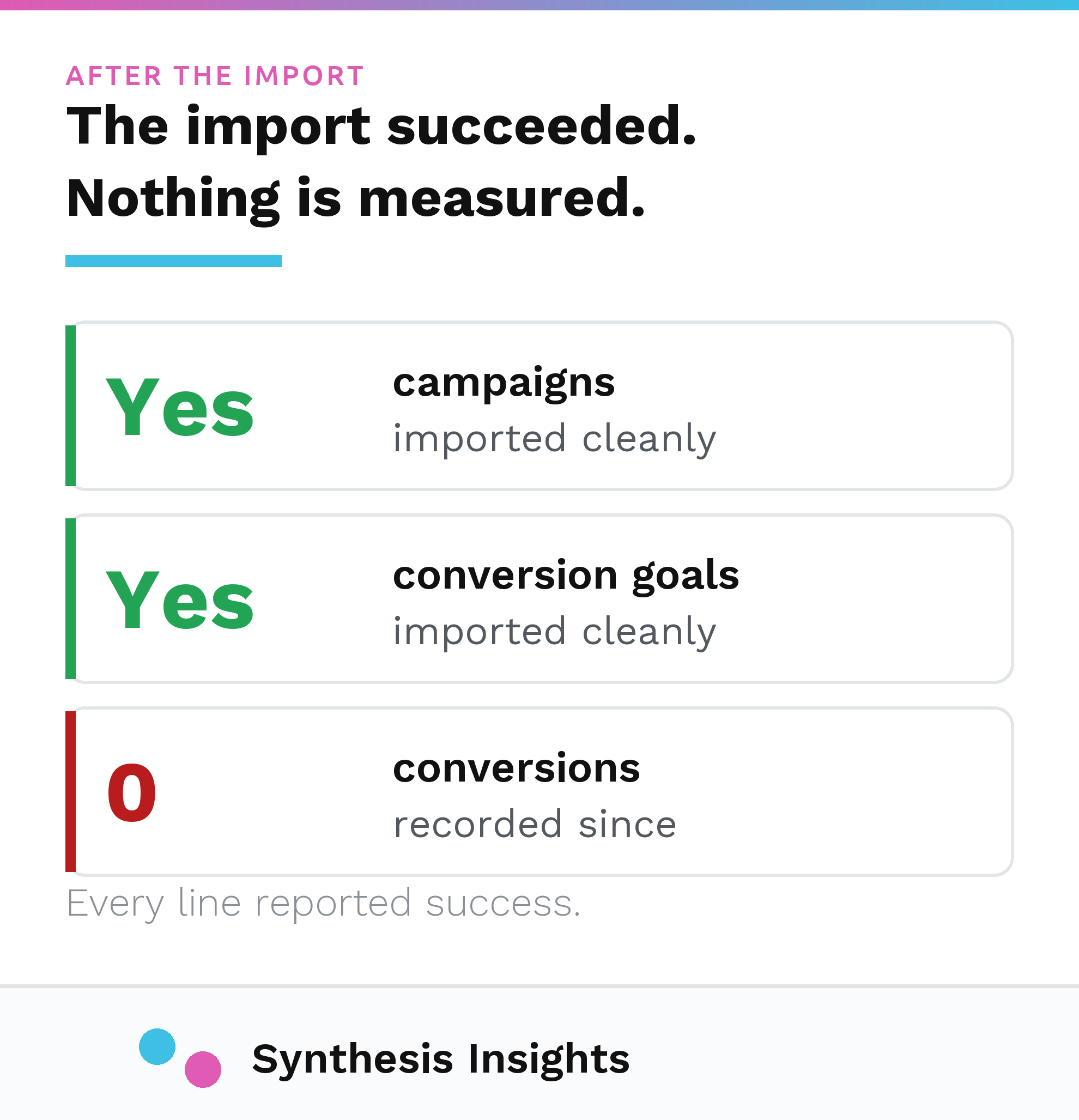
You connect Google Ads to Microsoft Advertising, pick your campaigns, click import, and a few minutes later the campaigns are there. Same ad groups, same keywords, same ad copy. The status log says it finished. Nothing on the screen tells you which parts of the account did not come across, or which settings were changed on the way in, or that the thing you most need to work is not going to.
Most accounts I inherit are either not running Microsoft at all or running a stale import somebody pushed across two years ago and never touched again. The second one looks healthier than it is. There are live campaigns spending real money against a snapshot of a Google account that has since been restructured twice.
Microsoft is upfront about this in the developer documentation, in a line almost nobody reads:
"Keep in mind that not all information will be imported, but that doesn't mean it's not supported within Microsoft Advertising. So, after you import, be sure to review your campaigns to make sure everything is good to go and add the missing information back to your campaigns."
That is from Microsoft's own Google Ads Import guide. Everything below is the specific version of "review your campaigns," in the order the gaps actually cost money.
First, what the import is
The import copies a set of campaigns out of Google Ads and creates the Microsoft Advertising equivalents. You can run it once, or you can put it on a schedule. Microsoft's documented scheduling options are "Auto," "Now," "Once," "Daily," "Weekly," and "Monthly."
Running the import is the right call and I do it on every account. Microsoft carries far less search volume than Google, so building a Bing account by hand is rarely worth the hours, and the keyword and ad structure you already validated on Google is a reasonable starting point. The import is a good tool that still leaves work behind it, and the gap between what it does and the finished job is where accounts rot.
An import is a snapshot, not a sync
This is the part that surprises people who have a scheduled import running and assume the two accounts are mirrors of each other.
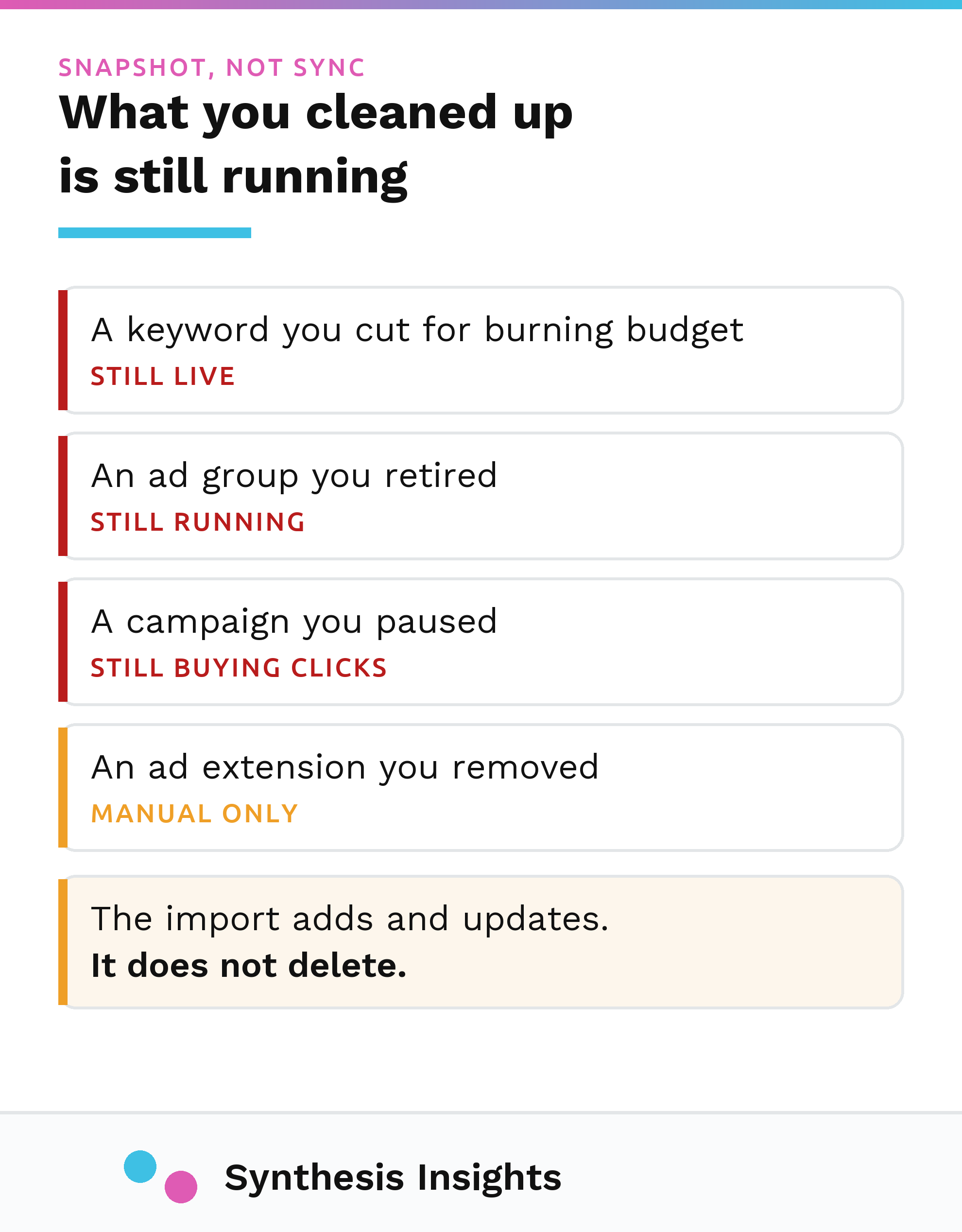
By default, the import adds and updates. It does not delete. Microsoft documents the setting that changes this, and documents that it is off:
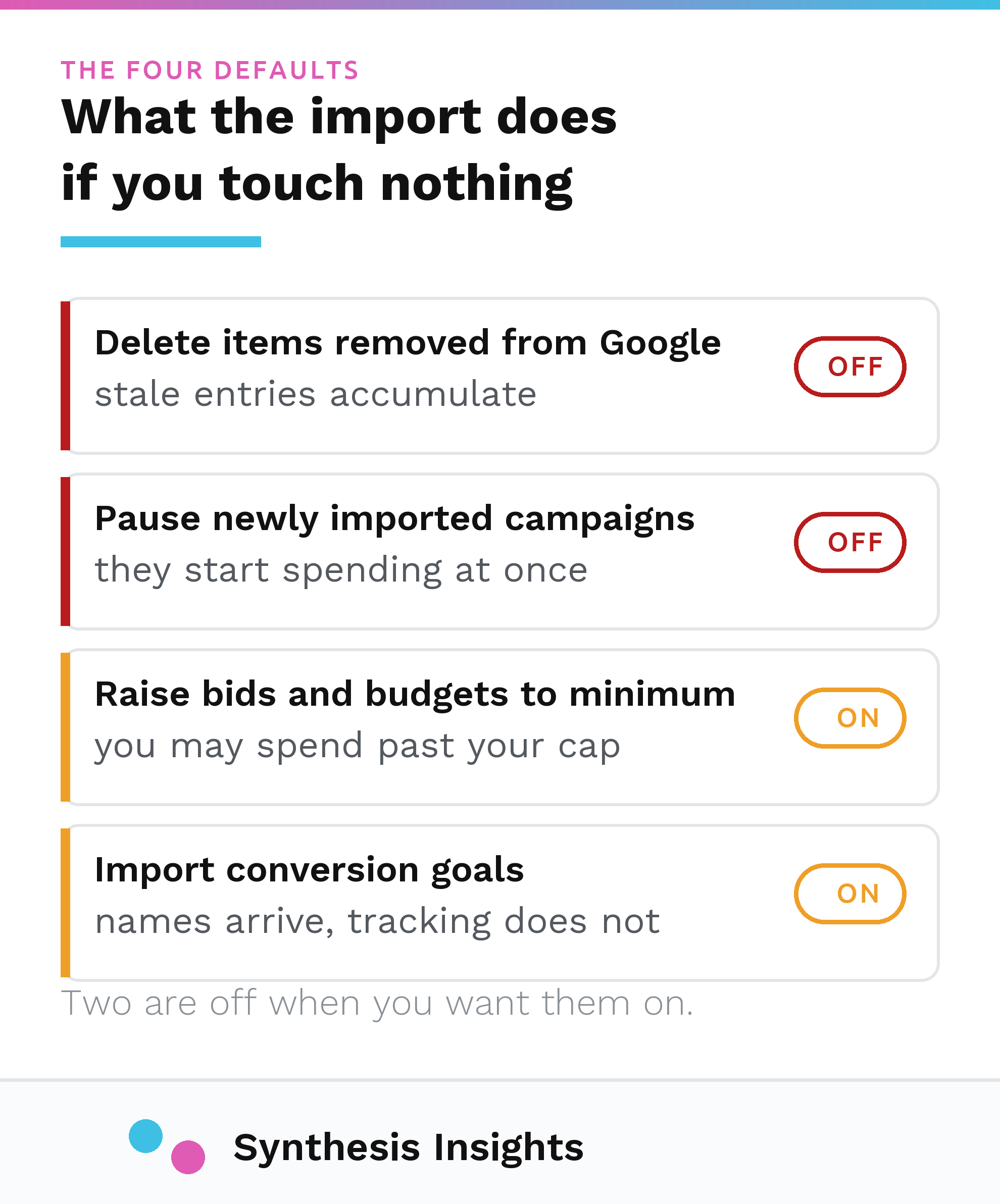
"Removed Google Ads items will be deleted along with their associated sub-items. For example if you removed a Google Ads campaign since the previous import, then the campaign and its ad groups, ads, and keywords will be removed from Microsoft Advertising when the import runs next time. [...] This option is turned off by default, or effectively set to false."
That is the DeleteRemovedEntities option, and off is the default in the interface too, where it reads "Delete items that have been removed from your Google Ads account."
So think about what that means over two years of ordinary account management. Every keyword you cut on Google for burning budget is still live on Microsoft. Every ad group you retired is still running. The campaign you paused when the product line was discontinued is still buying clicks. None of it produced an error, because none of it is an error. The import did exactly what it was configured to do.
Even turning the setting on does not close the gap completely. The same documentation page adds one exception:
"Ad extensions removed in Google Ads will not be deleted in Microsoft Advertising."
Extensions are the additional lines that appear under an ad, like extra links, phone numbers, or short benefit statements. A retired promotion or a phone number that has changed hands can sit in a Microsoft account indefinitely, and no import setting will clear it out. That one is manual, permanently.
Your conversion goals come across. Your conversion tracking does not.
This is the one that costs the most, and judging by what people search for on the way to this page, it is the one they are actually here for.
Conversion goals do import. Microsoft has that switched on by default:
"Import conversion goals that have not previously been imported. This option is enabled by default, or effectively set to true."
So after the import you open Microsoft Advertising, go to conversion goals, and there they are. Same names as Google. It looks configured.
Here is the problem. A Microsoft conversion goal does not measure anything by itself. It counts events reported by a separate piece of tracking code called the UET tag, short for Universal Event Tracking, which is Microsoft's equivalent of a Google Ads conversion tag and is a completely different tag from the one Google uses. Microsoft's documentation is unambiguous about the dependency:
"UET is a prerequisite for conversion tracking and remarketing in paid search."
And on what a goal actually is:
"Conversion goals allow you to specify which actions (recorded by UET) to count as conversions."
Both from Microsoft's Universal Event Tracking guide. Put the two together and the consequence follows: a goal imported from Google, on a site with no UET tag installed, is a name attached to nothing. It will sit in the interface looking correct and report zero for as long as you leave it there.
You can see the dependency in the import screen itself if you know where to look. In Microsoft's own description of the option paths, conversion goals are not filed under keywords or campaigns. They sit under UET tag: "Import from Google Ads > Choose import options > What to import > UET tag > Conversion goals." The tool is telling you what the goals need, though it says nothing about whether you have it.
So if you got here searching for how to import your analytics goals into Bing, the honest answer is that the goal definitions come across on their own while the measurement underneath them stays behind. Install and verify the UET tag first, then import, then confirm the tag is recording before you trust a single conversion number in the account.
Do not treat that last step as a formality. A tag that never fires produces a very convincing zero, and a zero is the number people cut campaigns on. I have written separately about what it costs to act on that zero without checking the measurement first. If you are looking at zero conversions on a freshly imported Microsoft account and reaching for the pause button, check the tag before you check the keywords.
Remarketing does not come across at all unless you tell it to
Remarketing lists are audiences of people who already visited your site, and they are the other thing built on the UET tag. They have their own trap, and it is quieter than the conversion goal one because nothing about it appears in the interface as a problem.
Microsoft's import has a field for the UET tag you want the imported audiences attached to. If you leave it empty:
"If this option is null or empty, your remarketing lists, targets, and exclusions will not be imported."
No warning, no error line, no partial result. The audiences just are not there. Microsoft also notes on that same page that importing remarketing lists is limited to accounts in a pilot program, so it may not be available on yours at all.
The practical consequence is that any audience-based bid adjustment you rely on in Google is absent from the Microsoft version of the campaign until you rebuild it by hand. If your Google performance depends materially on bidding differently for returning visitors, the imported campaign is not the same campaign, whatever the structure looks like.
Bids and budgets can change on the way in
Microsoft has different minimum bid and budget requirements than Google, and by default the import raises anything that falls below them rather than skipping it. Microsoft states the consequence plainly:
"Due to differences in Microsoft Advertising and Google Ads minimum bid requirements any bids below the our minimum amount will automatically be raised during import. This means that the amount of money you spend overall may increase for the imported campaigns."
The same wording appears for campaign budgets. Both options are on by default. The trade is real in both directions: turn the raise off and, in Microsoft's words, "any campaigns that don't meet the minimum amount will not get imported." So you either accept bids and budgets you did not set, or you accept campaigns silently missing from the account. Knowing which one you chose is the point.
One more default worth knowing before you click. The option to pause newly imported campaigns is off, described by Microsoft as "This option will pause newly imported campaigns allowing you to review your campaigns before you get your campaigns up and running. This option is turned off by default." Leave it alone and your imported campaigns start serving and spending the moment the import finishes, before anybody has reviewed a single ad.
Negatives arrive, then behave differently
Your negative keywords do import, including account-level negatives and shared lists. They just do not work the same way once they land, for two reasons I covered in detail in the post on finding negative keywords and will not repeat at length here.
Microsoft has only two negative keyword match types, phrase and exact. There is no broad negative match, so any exclusion you wrote as a broad negative on Google loses coverage the moment it crosses over. And Microsoft does not absorb misspellings the way Google does, so a list that is airtight on one platform has holes on the other. Neither difference produces an error at import. You find out from the search terms report, months later, if you look.
What to check after the import
The review Microsoft tells you to do, in the order that costs the most money if you skip it.
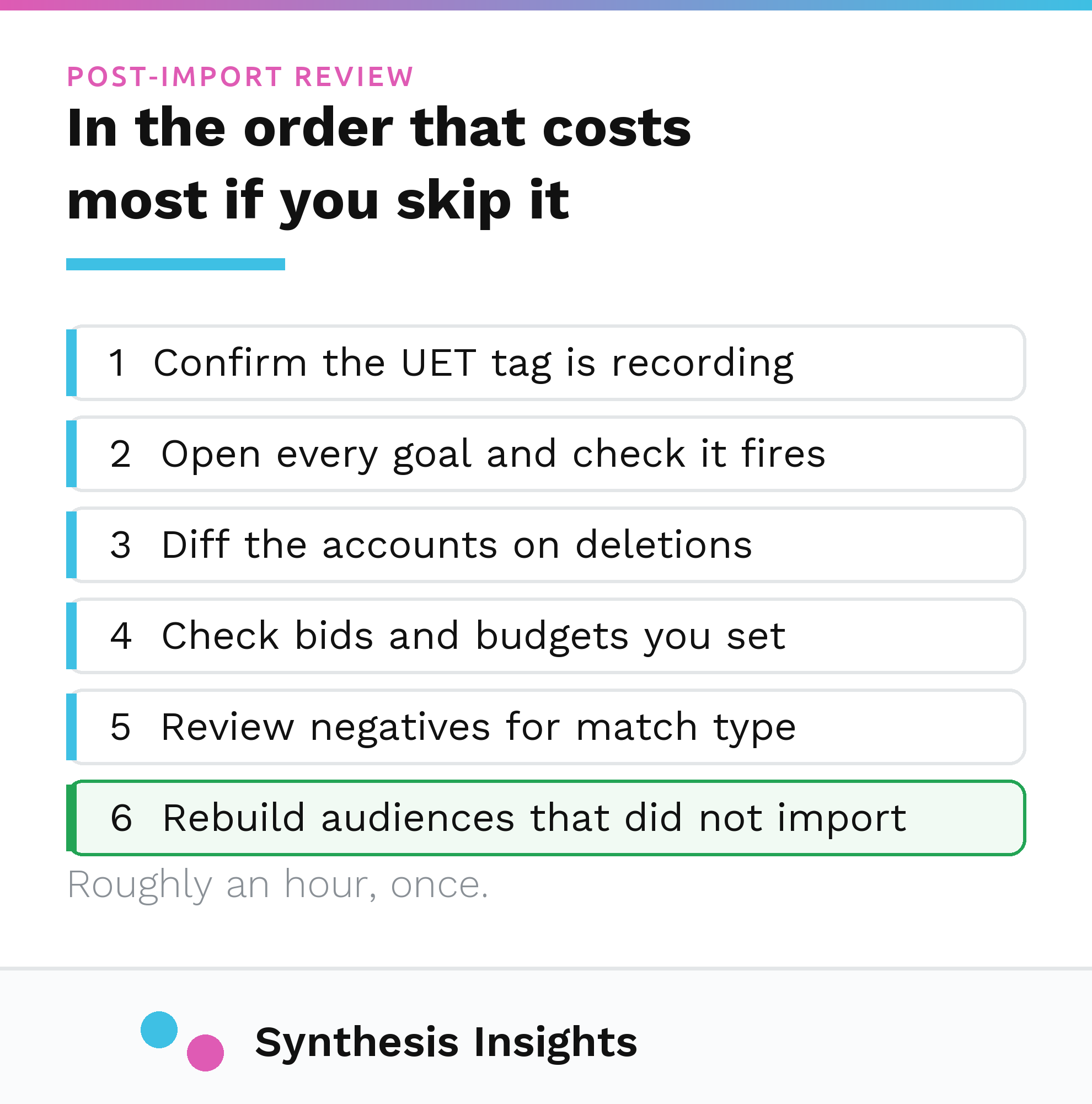
- Confirm the UET tag is on the site and recording before you read any conversion number. This is first because everything downstream is unreadable without it.
- Open every imported conversion goal and confirm it is attached to that tag and firing on the action you think it is. A correctly named goal can still be recording nothing at all.
- Diff the two accounts on deletions. Pull the live Microsoft campaign, ad group and keyword lists and compare them against what is currently active in Google. Anything running on Microsoft that no longer exists in Google is either a deliberate exception or leftover from a snapshot, and you should know which.
- Check bids and budgets against what you set on Google, because the defaults may have raised them.
- Review negatives for match type, not just presence. Broad negatives need rewriting as phrase, and misspelling variants need adding by hand.
- Rebuild any audience targeting that did not come across, or accept that the campaign is running without it.
On any account I manage, steps 3 and 4 come from a live data pull. Microsoft Advertising campaign, ad group and keyword data is queryable directly, so the comparison against Google is a report you can actually run.
Honest limits
A few things this does not tell you.
Microsoft's list of import options is explicitly incomplete. The documentation says so: "Please note that the list below is not a comprehensive list of imported items." So the defaults above are the ones that matter most in my experience, the full set is longer, and Microsoft adds new ones over time without an announcement most advertisers will see.
Import behaviour also changes. Every quote here was checked against Microsoft's current documentation in August 2026, and the underlying pages carry their own revision dates. If you are reading this a year from now, confirm the defaults before you rely on them.
And the parts of this that come from my own accounts are observations from the accounts I have inherited and run, and I have not surveyed the industry. The pattern of stale imports is consistent enough that I check for it first on every new engagement, but that is a working assumption I formed from a book of clients, which is a long way short of a measured population.
Why any of this is worth an hour
Microsoft is worth running for most of the industrial and commercial accounts I work on, though not for the reason most people repeat. Across the accounts I run, search volume on Microsoft usually lands somewhere around 15 to 25 percent of Google for the same keywords, and the audience skews older, which matters a great deal in some categories and not at all in others. That range is my own working expectation from a book of clients, with no published benchmark behind it, so use it to set expectations and then measure your own. It is a real channel and the volume is worth having.
But a channel you cannot measure just sends you a bill. The reason the stale import is so common is that nothing about it looks broken. Spend goes out, clicks come in, the campaigns are named sensibly, and the conversion column reads zero, which everybody quietly attributes to Bing being Bing when the cause is a tag that was never installed.
If you have a Microsoft account running off an import you did not set up, the first question worth asking is whether anything in that account is being measured at all, well before you get to whether the campaigns are any good. Mirroring proven Google campaigns into Microsoft is part of what our B2B PPC service covers. Book an intro call and we can look at it together.